How to allow browser to access to local applications
When you first access a site that requires access to local applications, a pop-up may appear asking you to Allow or Block the connection. In the example below, when accessing the print test area within systemhunt.com, Google Chrome will ask you to grant access.
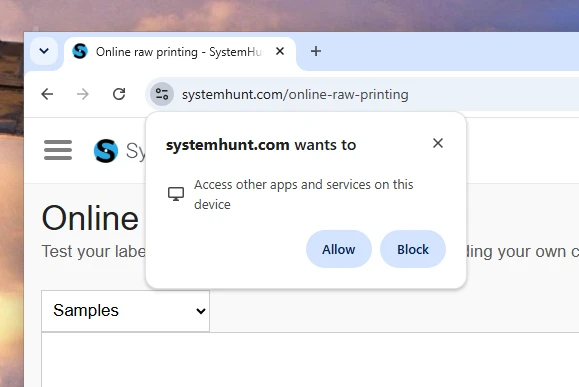
The WebLabel print server requires this permission to be confirmed so that the browser can connect to your device, list local printers, and send print commands.
What if the authorization pop-up doesn't appear?
Not all browsers prompt for this permission, some will allow direct connections to local applications by default. However, if the program embedded in the website is not working, it may be necessary to check the status of this authorization.
It is also possible that permission was previously denied and the pop-up is not appearing again. To resolve these situations, click the icon to the left of the URL in the address bar and check the settings for the site.
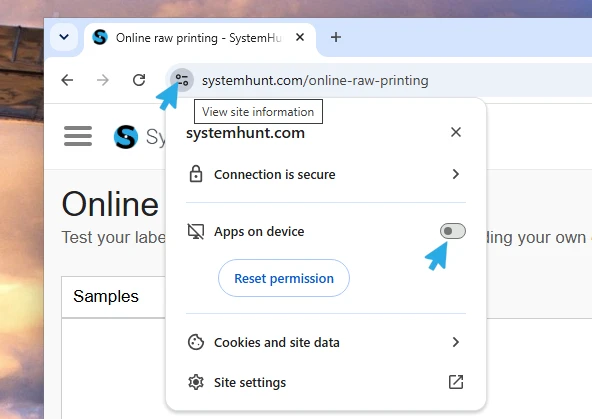
Enable the Apps on device option. You can also reset the current permission and force the pop-up to appear again. Don't forget to reload the page after adjusting these settings.
By enabling access to local apps, the embedded WebLabel code snippet will function within the site. Remember to also install WebLabel on this device beforehand; it runs a local print server that enables communication between the browser and your printers.

 Carregando...